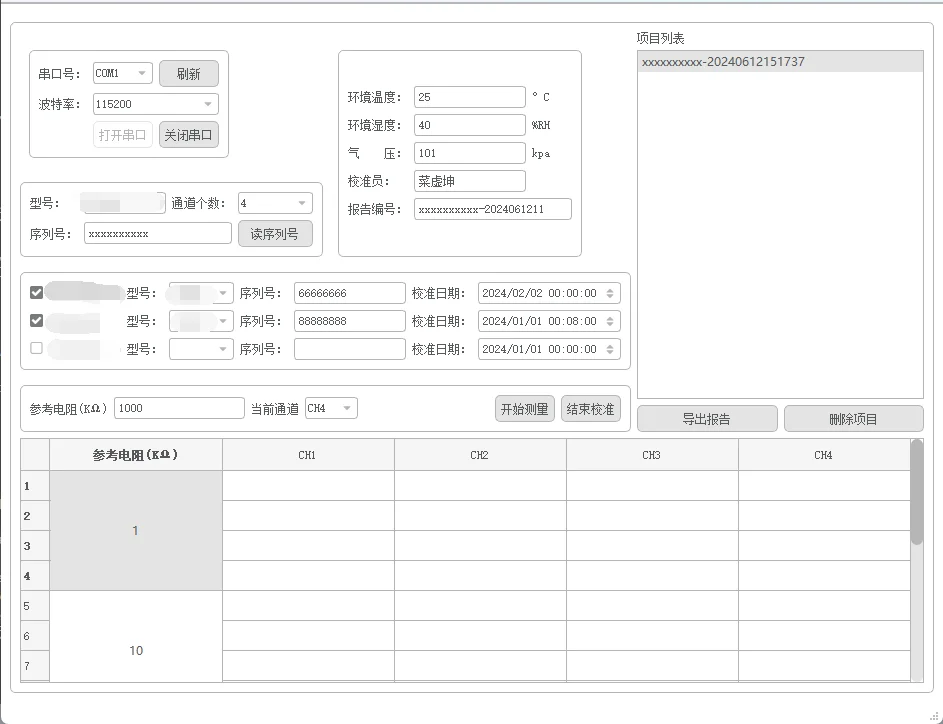
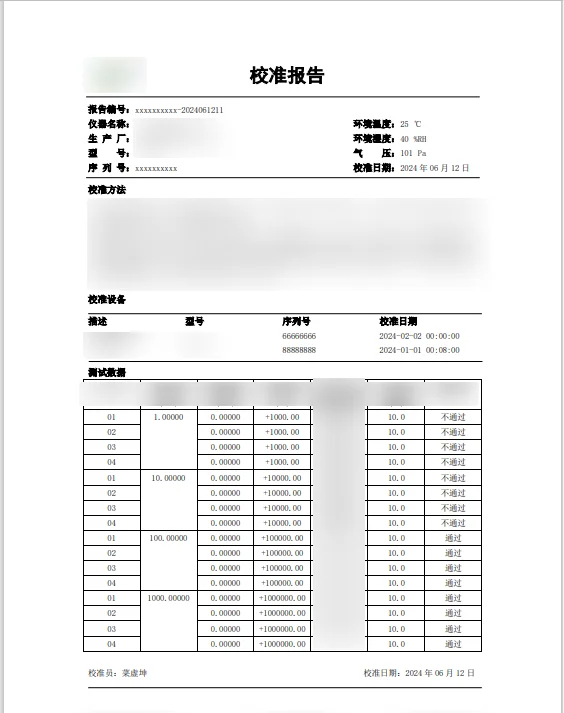
使用 QAxObject 进行 Word 文档生成:基于子线程的导出任务
在使用 Qt 开发应用时,有时需要生成 Word 文档。在这篇文章中,我们将讨论如何通过子线程使用 QAxObject 生成 Word 文档。以下代码演示了如何在子线程中处理文档导出任务。
成品演示
代码结构
首先,我们有一个 ExportTask 类,继承自 QObject,并且包含了以下功能:
- 初始化:将
QVariantMap 数据作为参数传递给构造函数。
- 文档处理:在
process() 函数中创建和编辑 Word 文档。
- 书签替换:
replaceBookmarkText() 函数用于替换文档中的书签文本。
- 表格行添加:
addRowToTable() 函数用于在指定的表格中添加行。
- 合并单元格:
MergeCells() 函数用于合并表格中的单元格。
- 合并相同值单元格:
mergeSameRefResCells() 函数用于合并相同值的单元格。
关键部分分析
构造函数与 QVariantMap 数据
1
| ExportTask::ExportTask(const QVariantMap& data) : data(data) {}
|
这个构造函数接受一个 QVariantMap,它包含了所需的所有数据。确保传递的 QVariantMap 包含所有必要的键和值。
process() 函数:文档处理的核心
1
2
3
4
5
6
7
8
9
10
11
12
13
14
15
16
17
18
19
20
21
22
23
24
25
26
27
28
29
30
31
32
33
34
35
36
37
38
39
40
41
42
| void ExportTask::process() {
CoInitialize(NULL);
QAxObject* word = new QAxObject("Word.Application");
word->setProperty("Visible", false);
QAxObject *documents = word->querySubObject("Documents");
documents->dynamicCall("Add(QString)", data["templatePath"].toString());
QAxObject *document = word->querySubObject("ActiveDocument");
replaceBookmarkText(document, "lineEdit1", data["lineEdit1"].toString());
replaceBookmarkText(document, "reportNum", data["reportNum"].toString());
QAxObject* table = document->querySubObject("Tables(int)", 2);
QAxObject* rows = table->querySubObject("Rows");
foreach (const QVariant& row, data["tableRows"].toList()) {
addRowToTable(rows, row.toMap());
}
delete rows;
delete table;
mergeSameRefResCells(newTable, data["measurements"].toList());
QString tempPath = QDir::tempPath() + "/TempDoc_" + timestamp + ".docx";
document->dynamicCall("SaveAs(const QString&)", QDir::toNativeSeparators(tempPath));
document->dynamicCall("Close (boolean)", false);
word->dynamicCall("Quit()");
emit finished(timestamp, tempPath);
CoUninitialize();
}
|
注意点:
- CoInitialize:调用
CoInitialize(NULL) 进行 COM 初始化,并在最后调用 CoUninitialize() 进行清理。
- QAxObject:用于操控 Word 应用程序和文档。需要创建 Word 实例,加载模板文档,编辑文档内容,并最终保存文档。
- 动态调用方法:使用
dynamicCall 动态调用 Word 方法,如 Add, SaveAs, Close 等。
replaceBookmarkText() 函数:书签文本替换
1
2
3
4
5
6
7
8
9
10
11
12
13
14
15
16
| void ExportTask::replaceBookmarkText(QAxObject* document, const QString &bookmarkName, const QString &text) {
QAxObject *bookmark = document->querySubObject("Bookmarks(QVariant)", bookmarkName);
if (!bookmark->isNull()) {
bookmark->dynamicCall("Select(void)");
QAxObject *range = bookmark->querySubObject("Range");
range->setProperty("Text", text);
QAxObject *font = range->querySubObject("Font");
font->setProperty("Name", "宋体");
font->setProperty("Size", 9);
font->setProperty("Bold", false);
delete font;
delete range;
}
delete bookmark;
}
|
注意点:
- 检查书签是否存在:通过
isNull 检查书签是否存在。
- 设置字体样式:可以自定义书签文本的字体和样式。
addRowToTable() 函数:表格行添加
1
2
3
4
5
6
7
8
9
10
11
12
13
| void ExportTask::addRowToTable(QAxObject* rows, const QVariantMap& rowData) {
QAxObject* row = rows->querySubObject("Add()");
if (row) {
QAxObject* cell1 = row->querySubObject("Cells(int)", 1);
if (cell1) {
cell1->querySubObject("Range")->setProperty("Text", rowData["checkBoxText"].toString());
cell1->querySubObject("Range")->setProperty("Style", "...");
delete cell1;
}
delete row;
}
}
|
注意点:
- 检查行和单元格是否存在:确保
row 对象存在再添加数据。
- 设置单元格属性:可以为单元格设置文本和样式。
MergeCells() 函数:单元格合并
1
2
3
4
5
| void ExportTask::MergeCells(QAxObject *table, int nStartRow, int nStartCol, int nEndRow, int nEndCol) {
QAxObject* StartCell = table->querySubObject("Cell(int, int)", nStartRow, nStartCol);
QAxObject* EndCell = table->querySubObject("Cell(int, int)", nEndRow, nEndCol);
StartCell->dynamicCall("Merge(LPDISPATCH)", EndCell->asVariant());
}
|
注意点:
- 合并单元格:通过
dynamicCall("Merge") 合并单元格。
- 设置合并后单元格样式:可以设置合并后的单元格样式,如对齐方式和字体。
mergeSameRefResCells() 函数:合并某一列连续相同值的单元格
1
2
3
4
5
6
7
8
9
10
11
12
13
14
15
16
17
18
19
20
21
22
23
24
25
26
27
28
29
30
31
| void ExportTask::mergeSameRefResCells(QAxObject* table, const QVariantList& measurements) {
QString prevRefRes;
int startRow = 2;
int currentRow = 2;
foreach (const QVariant& measurementVariant, measurements) {
QVariantMap measurement = measurementVariant.toMap();
QString currentRefRes = measurement["refRes"].toString();
if (currentRefRes == prevRefRes) {
QAxObject* currentCell = table->querySubObject("Cell(int, int)", currentRow, 2);
QAxObject* currentRange = currentCell->querySubObject("Range");
currentRange->setProperty("Text", "");
delete currentRange;
delete currentCell;
currentRow++;
} else {
if (startRow < currentRow) {
MergeCells(table, startRow, 2, currentRow - 1, 2);
}
startRow = currentRow;
currentRow++;
}
prevRefRes = currentRefRes;
}
if (startRow < currentRow) {
MergeCells(table, startRow, 2, currentRow - 1, 2);
}
}
|
注意点:
- 遍历测量数据:通过遍历测量数据找到相同值的单元格。
- 条件合并:如果发现相同值,将这些单元格合并。
注意事项
1
2
3
| QAxBase: Error calling IDispatch member Add: Exception thrown by server
QAxBase::dynamicCallHelper: Object does not support automation
...
|
如果遇到以上错误,请尝试执行以下操作:
QAxObject 在多线程中的初始化及调用代码必须放在同一个线程中。- 不能在子线程中使用
QAxWidget,QAxWidget 继承至 QWidget 类,不能在子线程中执行有关主线程的 UI 界面的操作。
- 在操作模板时,有些格式会影响
QAxObject 的正常使用,如合并单元格时,需要原始表格含有边框,否则会报错。
总结
通过子线程和 QAxObject 生成 Word 文档,能够提高应用的响应速度,并避免阻塞主线程。在实际应用中,注意处理异常情况,并确保所有 QAxObject 对象在使用后适时删除,以避免资源泄漏。